SDLC (Software Development Lifecycle)
Software Testing Overview
Manual Testing
Manual testing is the process of testing the software manually without using any automated tools or scripts. Testers execute test cases by hand to identify bugs or issues.
Automation Testing
Automation testing is the process of testing the software using automation tools or scripts, such as Selenium, to execute test cases faster and more efficiently.
Software Development Life Cycle (SDLC)
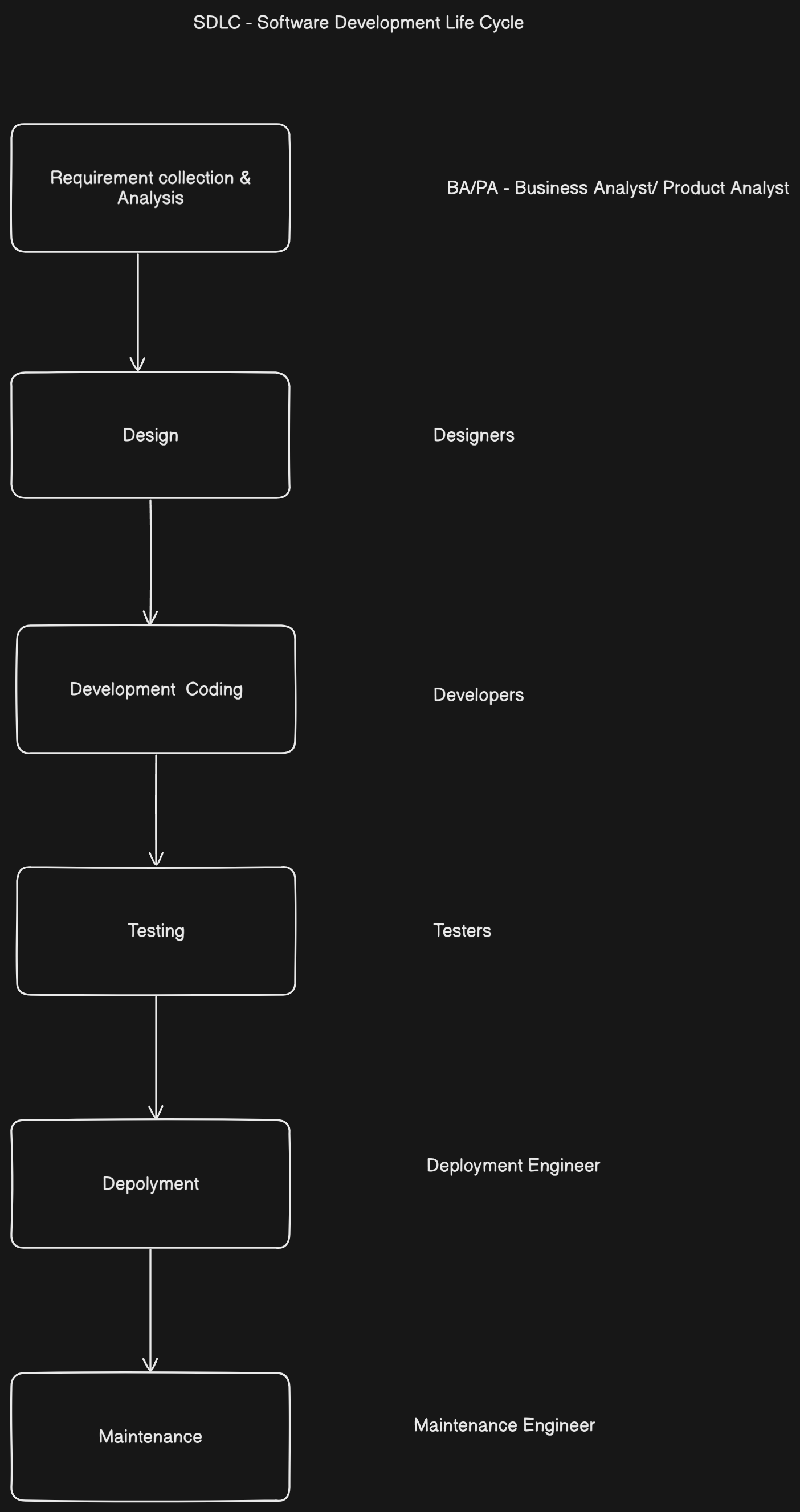
The SDLC consists of several stages used to develop high-quality software:
1. Requirement Collection and Analysis
-
Collecting and analyzing what the user needs.
-
Requirements should be:
- Unambiguous: No confusion in understanding.
- Feasible: Possible to achieve within resources.
- Complete: All necessary features included.
- Consistent: No contradictions; the first day’s requirement should match the last day’s requirement.
2. Design
This stage focuses on how the software will be structured.
-
High-Level Design (HLD):
- Architecture design, module definition.
- Flowcharts and block diagrams.
-
Low-Level Design (LLD):
- Detailed design for individual components or modules.
3. Development
- The actual programming or coding phase.
- Converts design documents into executable software using programming languages.
4. Testing
- Software is tested to ensure it meets the requirements.
- Ensures the product is testable and functions correctly.
- Types of testing include unit testing, integration testing, system testing, and acceptance testing.
5. Deployment
- The software is delivered to the customer.
- Installed and made operational in the production environment.
6. Maintenance
- Ongoing support after deployment.
- Involves fixing bugs, updating features, and ensuring continued performance.
Additional Concepts: Programming and Language Levels
What is a Program?
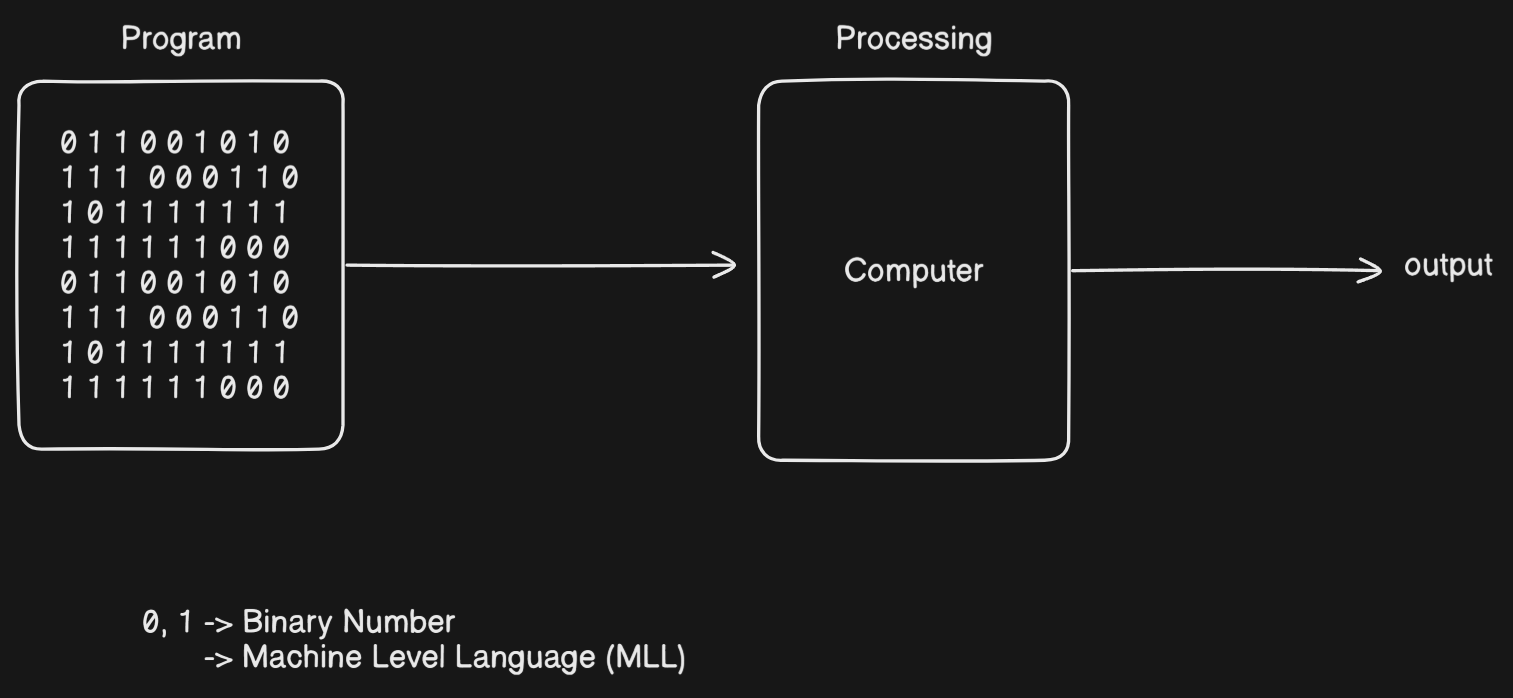
- A program is a set of instructions given to the computer to perform a specific task.
- The processing of a computer program is called programming.
What Does a Computer Understand?
-
Computers understand only binary numbers—0s and 1s.
-
These represent:
- Low voltage (0V) →
0 - High voltage (+5V) →
1
- Low voltage (0V) →
-
The language composed of 0s and 1s is called Machine Level Language.
High-Level Language and Java
-
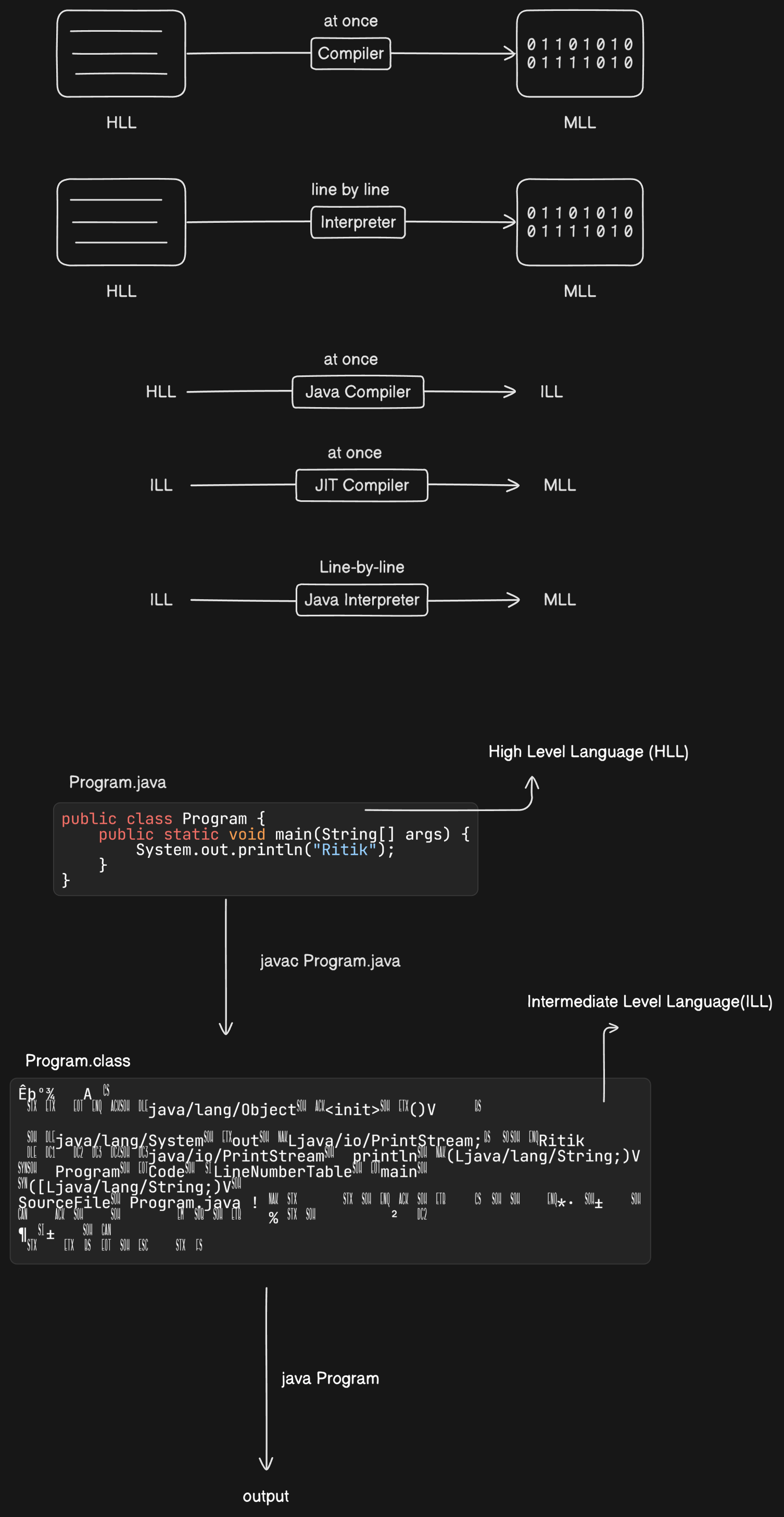
Java is written in high-level language (e.g., English-like syntax).
-
These instructions are converted to:
- Intermediate Level Language (Bytecode)
- Machine Level Language using JVM (Java Virtual Machine)
Role of JVM
- JVM translates Java bytecode to machine code.
- Acts as a bridge between high-level Java code and the hardware.
Features of Java Programming Language
Java offers a variety of powerful features that make it a widely used programming language:
High-Level Language
- Java syntax is similar to English, making it easier to read and write.
Platform Independent
-
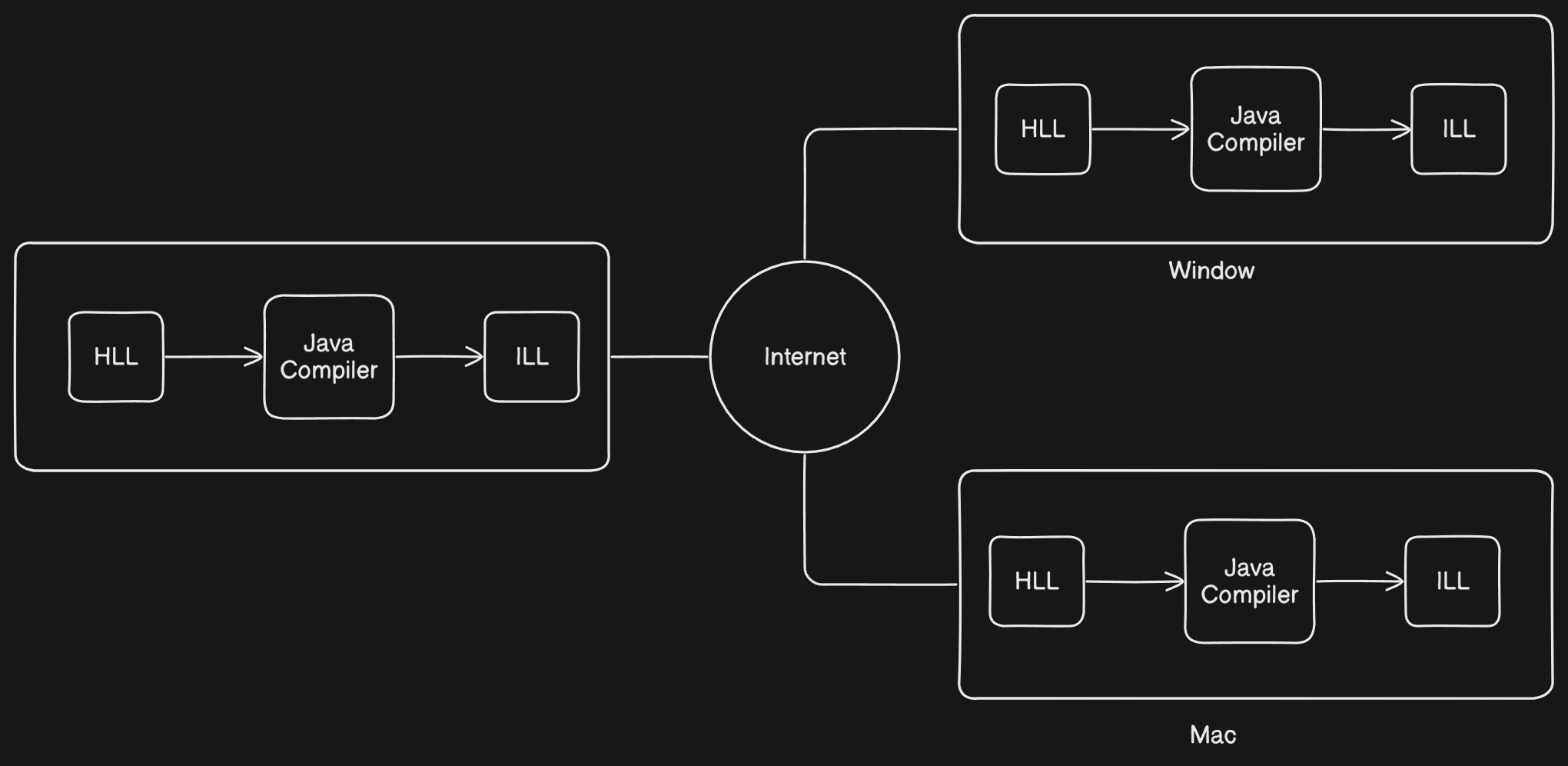
Java programs can be compiled on one platform and run on any other platform.
-
A platform includes both:
- Software (e.g., Operating System)
- Hardware (e.g., Microprocessor)
-
Example: Windows OS + Intel i3 = One platform
Object-Oriented
- Java uses classes and objects to organize code.
- Supports principles like encapsulation, inheritance, and polymorphism.
Write Once, Run Anywhere (WORA)
- Java programs do not need to be rewritten for different platforms.
- Compiled into bytecode which runs on JVM regardless of the underlying OS/hardware.
Architectural Neutral
- Java bytecode is independent of any specific architecture.
- A program compiled on one type of hardware can be executed on another without modification.
Internet Programming Language
- Java supports networked and web-based applications.
- Widely used in developing applets and server-side technologies.
Strongly Typed Language
- Type checking is done at both compile-time and runtime.
- Helps in detecting errors early.
Compiled and Interpreted
- Java code is first compiled to bytecode using
javac. - Then interpreted/executed by the JVM.
Architecture of Java Source File Execution
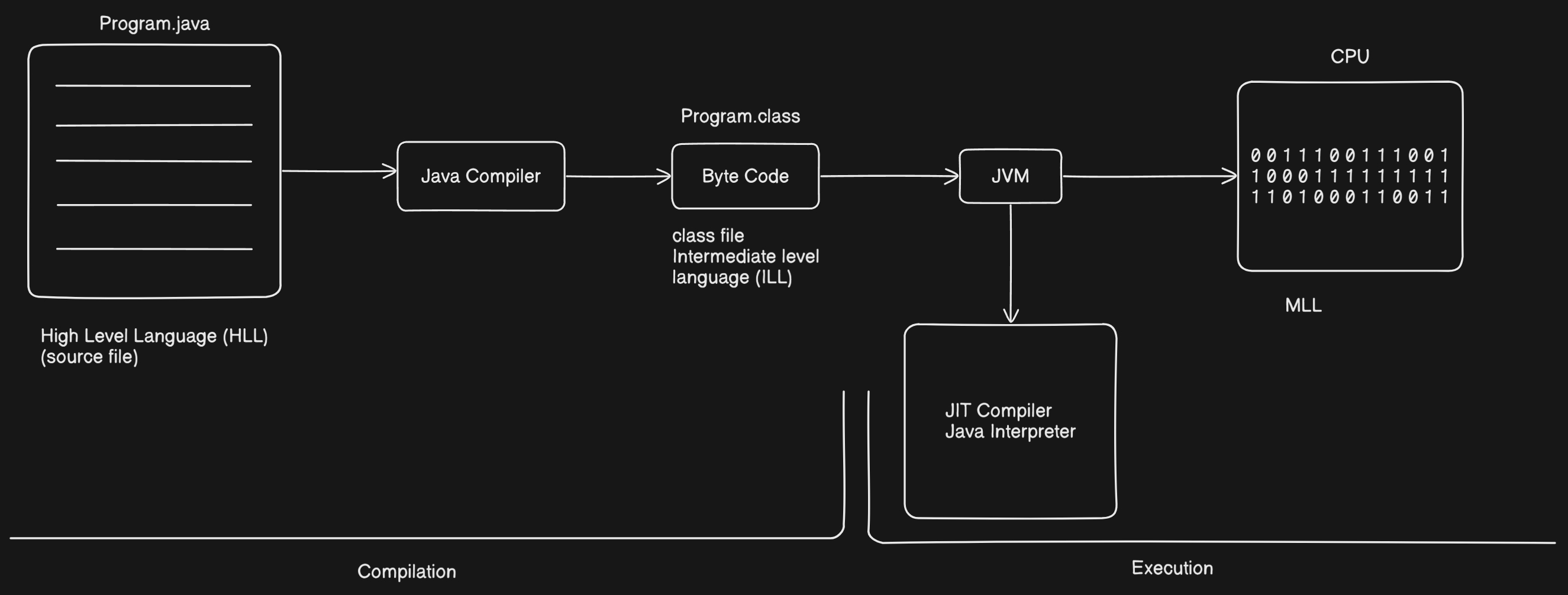
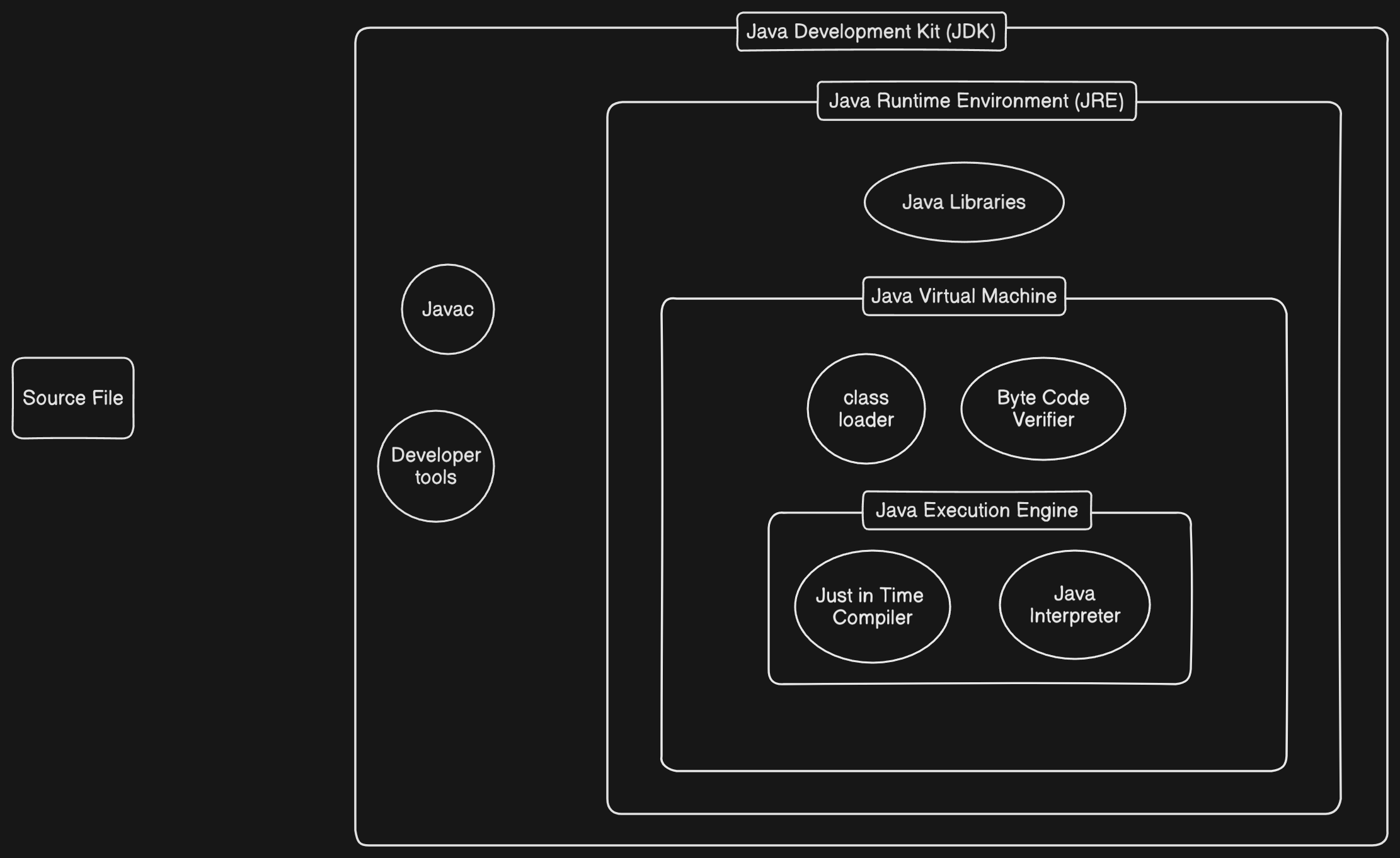
Understanding how Java code is compiled and executed involves knowing the components of the Java Development Kit (JDK) and how they interact:
Java Development Kit (JDK)
-
The JDK provides all the tools necessary to develop Java applications.
-
Contains:
javac(Java Compiler): Converts.javafiles to.classbytecode files.- Developer Tools: Debuggers, documentation tools, and other utilities.
- Java Runtime Environment (JRE): For running Java programs.
Java Runtime Environment (JRE)
-
A subset of the JDK, used for running Java programs.
-
Contains:
- Java Virtual Machine (JVM)
- Java Class Libraries (API)
Java Virtual Machine (JVM)
-
JVM is responsible for running the bytecode.
-
Inside JVM:
-
Class Loader: Loads compiled
.classfiles. -
Bytecode Verifier: Checks for code security and validity.
-
Execution Engine: Runs the bytecode.
- Interpreter: Executes instructions line-by-line.
- JIT Compiler (Just-In-Time): Compiles bytecode into native machine code for faster performance.
-
Summary of Java Execution Flow
- Write Java Code →
.javafile - Compile using
javac→.classbytecode file - Run with JVM → Bytecode executed by the Execution Engine
Compilation and Interpretation
- Java uses both compilation and interpretation to run programs. This approach makes Java platform-independent and efficient.
- Both Compiler and Interpreter are called as Language Processors.
Java Compiler (javac)
- Converts Java source code (
.javafiles) into bytecode (.classfiles). - This bytecode is not machine-specific, so it can run on any platform with a Java Virtual Machine (JVM).
- This process is called compilation.
Java Execution Components
Java Interpreter (Part of JVM)
- The JVM reads the compiled bytecode and executes it.
- Initially, the interpreter runs the bytecode line by line.
- This makes execution platform-independent, but can be slower than direct machine code execution.
Just-In-Time (JIT) Compiler (Runtime)
- The JIT Compiler is part of the JVM.
- It improves performance by converting frequently used bytecode into native machine code at runtime.
- This allows faster execution after the first run.
Java Execution Flow Summary
Compilation:
Java source code (.java) → Java Compiler → Bytecode (.class)
Interpretation + JIT Compilation:
Bytecode → JVM → Interpreter (line-by-line execution)
Frequently executed code → JIT Compiler → Machine code
Java Interpreter and Just-In-Time (JIT) Compiler
Java Interpreter – What is it and how does it work?
When you compile a .java file (using javac), it gets converted into a .class file (bytecode).
The Java Interpreter, which is part of the JVM, reads the .class file line by line and executes it immediately.
Example:
Imagine you wrote a program with 10 lines of code. The Interpreter:
- Reads Line 1 → executes it
- Reads Line 2 → executes it
- Continues this process for all the lines
Problem:
- It reads the same line every time → slow execution.
- Performance drops for larger or repetitive programs.
When is it useful?
- When the program is small.
- When you want to quickly run the program to check if it works.
Just-In-Time (JIT) Compiler – What is it and why is it important?
The JIT Compiler is also part of the JVM.
It becomes active at runtime (while the program is running).
While the Interpreter reads the same line multiple times, the JIT Compiler converts that code into native machine code (which the CPU can understand) and stores it for future use.
What are the benefits?
- The next time the same code runs, JVM executes it directly from machine code, without interpreting it again.
- This makes the program run much faster, especially for larger or repetitive code.
What does "Just-In-Time" mean?
- Compilation happens only when needed, i.e., at runtime.
- It's not done beforehand or afterward—just when it's required, hence "Just-In-Time."
Java Execution Flow
Compilation:
.java file → Java Compiler → .class (bytecode)
Execution:
- The Interpreter in JVM executes the bytecode line by line.
- If JVM notices that some code is repeated multiple times:
- The JIT Compiler converts that code into native machine code.
- The next time that code runs, Interpreter is not used. Instead, it directly uses the faster machine code for execution.
Flow Diagram